

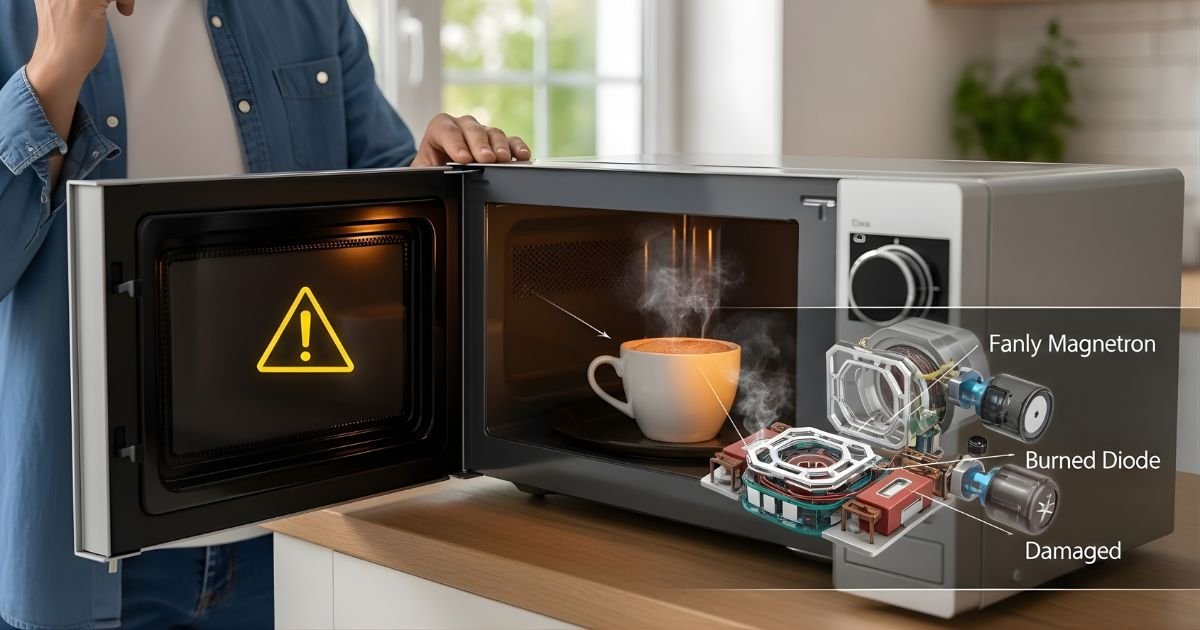
You expect a microwave to heat food fast, so it feels wrong when it stops working. Most of the time a microwave stops heating because an internal part like the magnetron, a fuse, or a door switch fails, or because of a simple user or power issue you can check quickly. This article shows the likely causes and what to try before paying for a repair.
You will learn quick checks you can do safely, signs that point to specific parts, and when it makes sense to call a pro. Knowing the usual problems helps you fix the issue faster or avoid a costly mistake.
Key Takeaways
- Simple checks can rule out power or user errors before repair.
- Faulty internal parts like the magnetron or fuses often stop heating.
- Basic maintenance and safe diagnosis can extend microwave life.
How Microwaves Heat Food
Microwave ovens turn electrical energy into radio waves that make water molecules and some fats move rapidly. This movement creates heat inside the food, not from a hot plate or flame.
Microwave Technology Overview
A microwave oven uses high-frequency electromagnetic waves, usually around 2.45 GHz. Those waves pass into the cooking cavity and are absorbed mainly by water, fats, and sugars in food.
The oven walls and turntable keep the energy inside and help distribute it. Metals reflect microwaves, which is why metal inside the oven can cause arcing or sparks.
Power settings change how long the magnetron runs, not the wave frequency. Lower power cycles the magnetron on and off to reduce average energy, so food cooks more slowly but with the same type of radiation.
Role of Magnetron
The magnetron is the component that creates microwaves. It converts high-voltage electrical energy into microwave radiation at the oven’s operating frequency.
When the magnetron fails, the oven will run but food will not heat. Common failure signs include a humming sound without heating, blown fuses after attempting to heat, or a burning smell.
Replacing a magnetron requires handling high-voltage parts and radiation-safe assembly. Many technicians recommend professional repair because capacitors can hold dangerous charge even after unplugging.
Function of Waveguide
The waveguide channels microwaves from the magnetron into the cooking cavity. It ensures the energy moves in a controlled path instead of scattering unevenly.
A blocked or damaged waveguide cover (often a mica sheet) can absorb or reflect energy and cause poor heating or arcing. Food splatters or grease on the cover reduce efficiency and may burn.
Cleaning the waveguide cover and replacing cracked covers are common homeowner fixes. If the waveguide itself is bent or corroded, professional service is usually needed to restore safe, even heating.
Common Causes of Microwave Not Heating
Most heating failures trace to three parts: the magnetron that makes the microwaves, the door switches that enable high-voltage power, and the high-voltage diode that directs power to the magnetron. Each can fail in different ways and shows specific symptoms.
Magnetron Failure
The magnetron produces the microwaves that heat food. When it fails, the microwave may run, the turntable may spin, and the light may work, but food stays cold. A failed magnetron often makes a humming sound or a burning smell before it stops working.
Technician checks:
- Measure high-voltage output with proper tools.
- Inspect for visible damage, burn marks, or cracked ceramic insulators.
Replacement notes:
- Magnetron replacement requires discharging the high-voltage capacitor and following safety protocols.
- Cost varies by model; sometimes replacement cost approaches buying a new microwave.
Safety table for magnetron checks:
| Step | Risk level | Action |
| Open cabinet | High | Unplug first; only qualified tech should proceed |
| Discharge capacitor | High | Use insulated tool and resistor method |
| Test magnetron | Medium | Use multimeter and service manual values |
Door Switch Malfunction
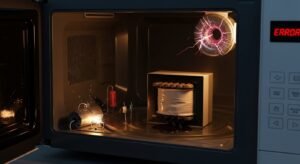
Door switches tell the microwave to allow high-voltage power. If one switch is faulty or misaligned, the oven may run but not heat. Common signs include the unit not starting at all, or starting but stopping when the door is pressed lightly.
What to inspect:
- Check if the door latch catches and releases cleanly.
- Test switches with a multimeter for continuity when the door is closed.
Replacement tips:
- Door switches are relatively low-cost and often accessible.
- Align the latch and replace any switches that fail continuity tests.
High Voltage Diode Issues
The high-voltage diode converts AC to DC and doubles the voltage for the magnetron. If the diode is open or shorted, the magnetron won’t get proper voltage and the microwave won’t heat. Symptoms include running noises without heating or a burned smell.
Troubleshooting steps:
- Test the diode with a multimeter (some tests need diode removal).
- Look for burn marks or blown insulation on the diode.
Repair guidance:
- Diode replacement requires capacitor discharge first.
- Match diode specifications exactly; wrong diode can damage the magnetron.
Quick reference table for symptoms and likely cause:
| Symptom | Likely cause |
| Runs but no heat; humming | Magnetron or diode |
| Won’t energize HV circuit; door issues | Door switch |
| Burning smell; smoke | Magnetron or diode failure |
Electrical Component Failures
These parts handle high voltage and heat inside the microwave. When one fails, the oven may run but stop producing heat or make unusual noises.
Failed Capacitor
A capacitor stores and releases high-voltage energy to drive the magnetron. If the capacitor cracks, bulges, or shorts, the magnetron won’t get the pulse it needs and the microwave will stop heating.
Symptoms include a loud pop at failure, no heat while the turntable still turns, or a meter showing the capacitor does not hold charge. Capacitors can retain dangerous voltage even after unplugging. Only a trained technician should test or replace them with the exact rated part.
Replacing a bad capacitor usually restores normal operation if no other components were damaged. Technicians inspect nearby parts — diode and magnetron — because a failed capacitor often affects them too.
Burnt Out Transformer
The high-voltage transformer steps up household voltage to power the magnetron. A burnt out transformer often smells of burned insulation and may show visible scorching.
Signs include buzzing, clicking, or complete silence with no heating. A transformer failure can result from sustained overheating, power surges, or a shorted winding. Testing requires a multimeter and knowledge of safe discharge procedures.
Transformers are heavy and integral to the microwave’s chassis. Repair typically means replacing the transformer with a factory-equivalent unit; reuse of a damaged transformer is unsafe and can cause further failures.
Blown Thermal Fuse
The thermal fuse protects against overheating by cutting power when temperatures exceed safe limits. A blown thermal fuse will stop the microwave from heating even if other components work.
Common causes include blocked vents, failed cooling fan, or repeated overheating events. The microwave may run lights and the turntable while the magnetron gets no power. A continuity test with a meter quickly confirms a blown fuse.
Thermal fuses are inexpensive and simple to replace. Technicians should also check why it blew — addressing cooling issues or ventilation can prevent repeat failures.
User-Related Issues
User mistakes and basic wear can stop a microwave from heating. Simple settings, how it is operated, and visible damage often explain the problem and can be fixed without calling a technician.
Incorrect Power Settings
Many microwaves have multiple power levels and preset cooking modes. If a user sets the power to a low percentage (for example, 10% or “defrost”), food will not heat quickly and might seem like the oven is not working. Always check the display and power-level indicator before assuming a fault.
Some models use sensor or eco modes that reduce output to save energy. A timer-only or “keep warm” setting can also run the oven without full heating. If the keypad is unresponsive, a stuck button or child lock can force low-power operation; consult the manual to reset these features.
Checklist:
- Confirm power level reads 100% or High.
- Cancel any sensor, eco, or keep-warm modes.
- Reset child lock or stuck buttons per manual.
Operating With No Load
Running a microwave empty can damage the magnetron, the component that generates microwaves. Without food or liquid to absorb the energy, microwaves reflect inside and can stress internal parts. Occasional short tests may be safe, but intentionally running long cycles with no load increases risk.
If a user tests the oven, they should place a cup of water inside to absorb energy. Use short intervals (30–60 seconds) and watch for unusual noises or sparks. If the unit has been run empty for several minutes, the magnetron or high-voltage components might have failed and will require professional inspection.
Safety tips:
- Never run long cycles empty.
- Always include a microwave-safe cup of water for short tests.
- Stop immediately if sparks, burning smell, or loud humming occur.
Damaged Turntable
A cracked or misaligned turntable can cause uneven heating, which may look like the microwave is not heating at all. The rotating plate helps spread microwaves across food; if it doesn’t turn, hot and cold spots form. Check for chips in the glass tray, broken support rollers, or a slipped drive coupling.
A turntable that rattles or won’t rotate usually needs one of three fixes: realign the tray on the support, replace worn rollers, or swap the drive coupling. Most parts are inexpensive and user-replaceable, but power should be unplugged before any inspection. If the motor that drives the turntable is dead, the microwave may still heat but with poor results; a technician can test and replace the motor if needed.
External Factors Affecting Microwave Performance
External issues like unstable electrical supply, tripped house circuits, and the wrong cookware can stop a microwave from heating. These problems are often easy to check and fix without opening the appliance.
Power Supply Problems
Voltage that is too low or too high can reduce heating or stop the microwave entirely. Microwaves need a steady supply—typically around 120 V in the U.S. or 230 V in many other countries—and frequent drops from heavy appliances on the same line can starve the magnetron of power.
Surges from storms or faulty wiring can damage internal electronics. A surge protector helps but may not stop a large spike; a qualified electrician should inspect the home wiring if surges recur.
Signs of supply problems include lights dimming when the microwave runs, erratic display behavior, or the microwave working intermittently. Measure voltage with a multimeter or have an electrician test the circuit to confirm.
Tripped Circuit Breaker
A tripped breaker cuts power to the outlet the microwave uses, making it seem like the microwave stopped heating. Breakers trip when the circuit is overloaded or a ground fault occurs.
Check the breaker panel first. Resetting a tripped breaker often restores power, but repeated trips signal a deeper issue like too many appliances on one circuit or a short in the microwave’s cord or plug.
If the breaker trips immediately after plugging in the microwave, unplug and stop using it. Have an electrician inspect both the outlet and the microwave cord before resetting the breaker to avoid fire risk.
Incompatible Containers
Using metal or certain non-microwave-safe plastics can block or reflect microwave energy, causing poor heating or sparks. Metal bowls, foil, and some containers with metallic paint can create arcing that damages the microwave’s interior parts.
Containers that are microwave-safe but too dense or very thick will heat unevenly and slow cooking. Items like ceramic with metallic glazes, insulated mugs, and sealed containers can trap steam and change heating behavior.
Always use labeled microwave-safe containers. When unsure, test short heating runs with small water quantities to check if the container stays cool and the water heats evenly.
Diagnosing a Microwave That Is Not Heating
Start by looking for visible problems and doing simple tests with different foods. Note damaged parts, odd noises, or inconsistent heating patterns. Know when to stop and call a trained appliance technician.
Inspecting Visual Cues
They should unplug the microwave before any close inspection to avoid shock. Check the door latch and seals for cracks, warping, or dirt that might stop the door switch from engaging properly. Look for burn marks, melted plastic, or brown spots inside the cavity and on the waveguide cover; these indicate arcing or past electrical failure.
They should spin a plate to confirm the turntable motor works and look for broken rollers or a loose coupling. Smell for a persistent burnt odor, which can point to a failed magnetron or capacitor. If any wires look damaged or insulation is melted, stop using the unit and seek professional help.
Testing With Different Foods
They should test heating with two simple items: a cup of water and a microwave-safe potato or bread slice. Heat 1 cup (240 ml) of room-temperature water for 1 minute and check temperature with a safe thermometer or by careful touch; the water should be noticeably hot. If water stays cool but the unit runs, that shows the microwave power is failing.
Next, heat a potato or bread for 30–60 seconds to check for uneven heating or cold spots. Rotate or reposition the food and repeat to rule out a bad turntable or placement issue. Never test with metal, sealed containers, or aluminum foil, and avoid running the microwave empty.
When to Seek Professional Help
They should stop DIY work if the microwave shows signs of electrical damage, loud humming, or repeated arcing. Complex components like the magnetron, high-voltage capacitor, transformer, and diode can hold lethal charge even when unplugged. Replacing these parts requires tools, safety measures, and knowledge most people do not have.
If the unit is under warranty, contact the manufacturer first. Otherwise, choose a certified appliance repair technician who offers a written estimate and parts warranty. If repair costs approach or exceed the price of a new microwave, consider replacement.
Preventive Measures and Maintenance Tips
Keep the microwave free of food residue, use only microwave-safe items, and check key parts periodically. Small habits and simple checks help prevent the common causes of heating failure.
Regular Cleaning
They should clean spills and splatters after each use to stop food from burning onto surfaces. Wipe the interior with a soft cloth dampened with warm, soapy water; avoid abrasive pads that can damage the cavity or coating. Clean the turntable and roller ring; dried food under the plate can cause uneven heating and noise.
They must inspect and clean the door seal and latch area. Grease or crumbs on the seal can prevent a tight door closure and trigger safety switches. If sparks or small arcs appear, unplug the microwave and remove food bits from the cavity and waveguide cover before testing again.
For stubborn stains, heat a bowl of water with lemon slices for 2–3 minutes, then let steam loosen residue for easier wiping. Avoid spraying cleaners directly onto vents or controls; instead, apply cleaner to a cloth. Regular cleaning reduces the chance of arcing and component stress.
Proper Use Guidelines
They should never run the microwave empty; doing so can damage the magnetron. Always place a cup of water inside if running briefly for testing or reheating without food.
Only use containers labeled microwave-safe. Metal, foil, or containers with metallic paint can cause sparks and damage high-voltage parts. Use microwave-safe lids or covers to reduce splatters and keep moisture even during heating.
They must avoid overloading the turntable or using oversized dishes that block rotation. Turntable blockage can cause uneven heating and put strain on the drive motor. Also, follow manufacturer power and time recommendations for popcorn, frozen meals, and reheating to avoid overheating the magnetron.
Scheduled Inspections
They should inspect the power cord and plug monthly for frays, cracks, or loose prongs. A damaged cord can cause intermittent power or a complete failure to heat. Replace any damaged cords before further use.
They must check the door latch and switches if the microwave fails to start or stops during operation. A misaligned latch or worn switch often prevents the unit from powering the high-voltage circuit. Use a professional if unsure, since testing door switches can involve disassembly.
Have a technician inspect high-voltage components (magnetron, diode, capacitor) every 2–4 years for heavy users. These parts wear out over time and require insulated tools and safety training to service. Scheduling professional checks reduces risk and can extend the appliance’s usable life.
FAQs
What are the first things to check when a microwave stops heating?
They should check that the door closes fully and the settings are correct. A blown fuse or tripped circuit can also stop heating, so inspect the plug and home breaker.
Can a microwave run but not heat?
Yes. It can spin and light up while the magnetron or high-voltage components fail. Running without heat often points to parts that need repair or replacement.
Is it safe to troubleshoot a microwave at home?
Basic checks like power, settings, and door latches are safe. They should not open the cabinet or touch high-voltage parts; those parts can hold dangerous charge even when unplugged.
When should a person call a technician?
If fuses, door switches, or the magnetron might be faulty, a trained technician should handle the repair. Professional service is also wise for older units or when replacement parts are needed.
Could simple maintenance prevent heating problems?
Yes. Cleaning the door seals and interior, avoiding metal inside, and using proper cookware help. Regular care reduces stress on parts and lowers the chance of sudden failures.
Is replacing the microwave better than repairing it?
They should compare repair cost to the price of a new unit. If the magnetron or other major parts fail and the appliance is old, replacement often makes more sense.
Quick checklist:
- Confirm power and settings.
- Inspect door and seals.
- Avoid internal repairs without training.
- Call a pro if major parts are suspected.
Conclusion
A microwave can stop heating for a few clear reasons: failed components like the magnetron, diode, or fuse; door switch or thermal safety failures; or simple user errors and power issues. They range from easy fixes to repairs that require a trained technician.
If a user sees no heat, they should unplug the unit and avoid using it until the cause is known. Small checks — door latches, circuit breakers, and settings — can save time and prevent risk.
For safety and cost, replace simple parts like fuses or door switches if the user is comfortable and follows the manual. For complex parts such as the magnetron or high-voltage components, a qualified repair service is the safer choice.
